
Failure Analysis
TestBeats provides a streamlined approach for test failure analysis and defect management. It helps teams investigate test failures, categorize defects, and track issues efficiently, enhancing overall test observability.
Classify test failures into categories and add a description of the issue.
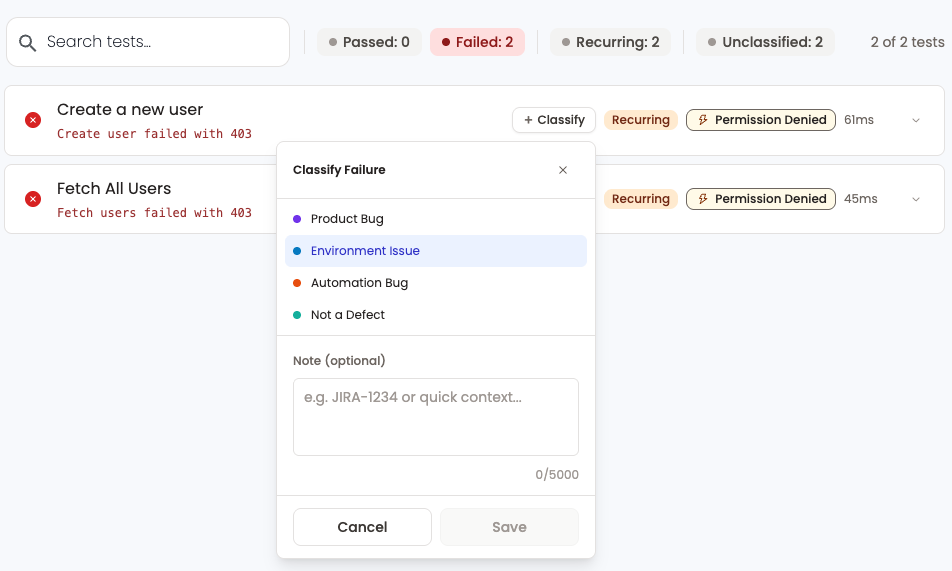
Test Failure Categories
Product Bug
Issues related to defects or faults in the software product itself that impact its functionality, performance, or usability.
Environment Issue
Problems arising from the environment where the software is deployed, including hardware, software dependencies, and network conditions.
Automation Bug
Issues encountered during automated testing processes, affecting the execution or reliability of automated test scripts.
Not a Defect
Cases where reported issues are determined not to be defects in the software, often due to resolution or misinterpretation.
How to investigate failures?
- Navigate to the test run in TestBeats portal.
- Click on the test case name to view the test details.
- Click on "Add Failure Analysis" under Failure Analysis tab.
- Select the appropriate failure category and write a description of the issue.
- Click on "Update" to submit the failure analysis.
Automated Failure Analysis
Once the failure has been analyzed, the system will automatically analyze any subsequent test runs. If a test case fails with a similar error, it will attach the appropriate categories based on the previous analysis.
Notes
INFO
This feature is inspired from Report Portal.
Next Steps
- Smart Analysis — trends across runs
- Error Clusters — group similar errors in a run
- AI Failure Signature — AI grouping by meaning
- Getting Started — how results reach the portal
- publish command — publishing from CI or locally